

To cancel your subscription plan, please proceed with the cancellation on a PC or smartphone browser.
Even after you cancel, your subscription will remain active until the next billing date. The plan will not be renewed and will be automatically canceled.
*Please note that Peatix does not issue refunds for fees already paid.
How to cancel your Subscription
1. Sign in to your account.
2. Open the "My Groups/Events" page.
- On PC browser: Click your account name in the top right.

- On smartphone browser: Tap "My Tickets/Events" or the menu button (≡) in the top right.

3. Select "Following" under "GROUPS".
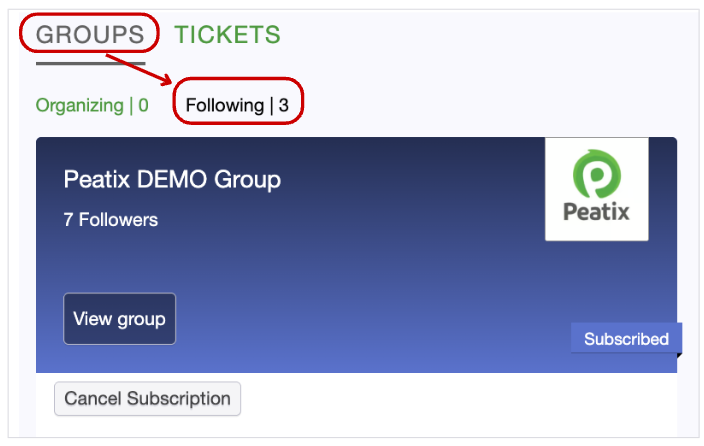
4. Click the "Cancel Subscription" button for the group you wish to cancel.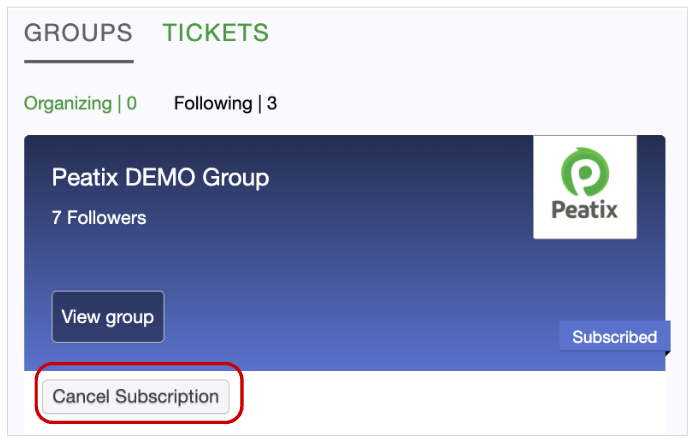
*The button is not displayed if your subscription is not active.
5. The confirmation screen shows the date until which you can continue to use the plan. Confirm the date, then click "OK".
6. A confirmation message appears, and the cancellation is complete.
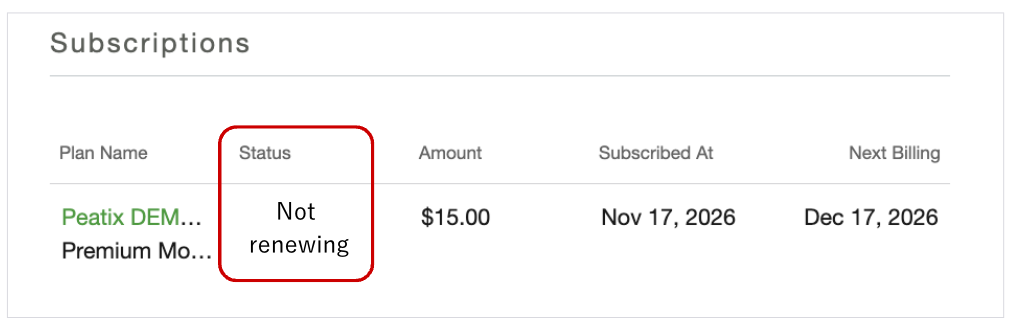
*After the cancellation is complete, the status in "My Account" > "Subscriptions" will be displayed as "Not renewing"
For your subscription membership status, see "How to check my subscription plan status?".