

Please see below for information on how subscription plans are renewed and what to note when canceling.
Before Joining a subscription plan
Joining
For details on how to join, see How can I join (renew) subscription plans?
*If the plan has an enrollment fee, you will need to pay the enrollment fee again if you rejoin.
Renewal
Once you join, subscription plan renews automatically. At each renewal, the membership fee is charged to the credit card you registered.
*The registered credit card cannot be changed. If you want to use a different card, please cancel your plan and then join again.
*You will not receive a notification email when subscription plan renews. If the automatic payment fails (for example, because your card has expired), you will receive an email asking you to update your card information.
*Receipts are not issued.
After Joining subscription plan
Canceling
If you cancel your plan yourself, your membership remains valid until the next billing date. The plan will not renew and will be canceled automatically. For details on how to cancel, see How do I cancel a subscription plans?
Other
If you have questions about the content of a subscription plan you have joined, please contact the organizer directly.
*Please contact the organizer from a web browser on your computer or smartphone. Messages cannot be sent from the Peatix app.
How to Contact the Organizer
1. Log in with the account you used to join the subscription plan, click your display name in the upper-right corner of the screen, and select “Subscriptions.”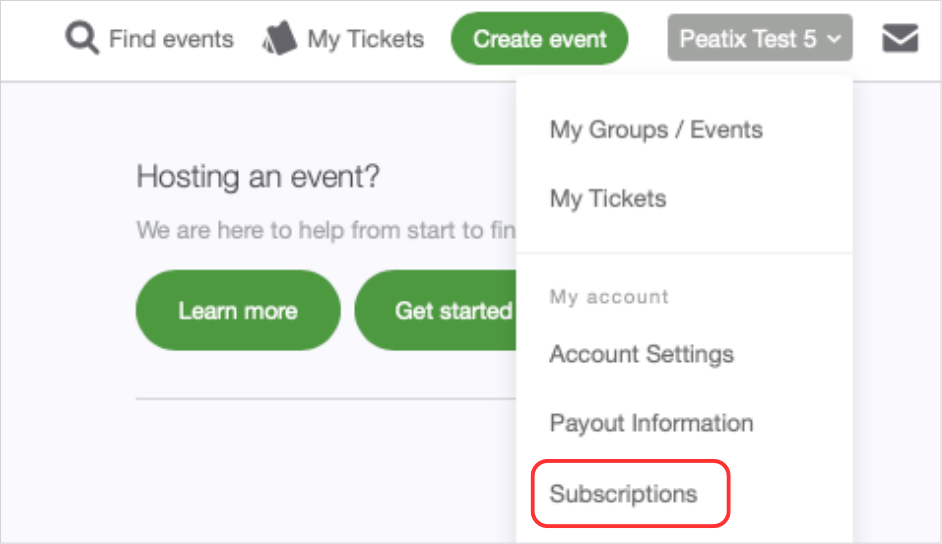
2. Click the plan name you are subscribed to. You will be taken to the group page.
3. On the group page, select “Subscriptions.” The “Contact organizer” button will appear.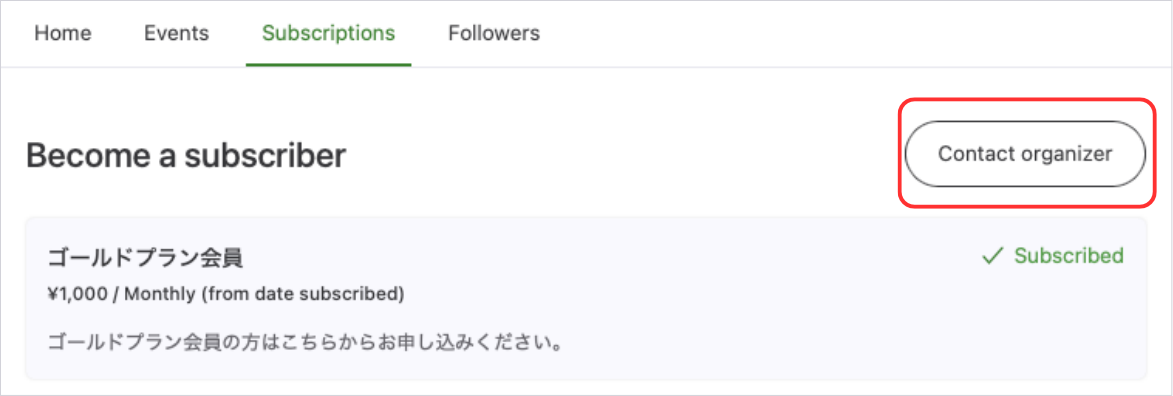
4. Enter a subject and your message, then click “Send.”